


Guests Get Frustrated Fast When They Can’t Find What They Need
Guests don’t like feeling lost. At campgrounds, RV parks, and outdoor hospitality properties, it happens all the time:
- They can’t find their site after after-hours arrival
- They miss the bathhouse turn and end up looping the park
- They can’t locate the office, the dump station, or the trailhead
- They’re unsure where to go during changing conditions (weather, fire restrictions, closures)
That confusion turns into repetitive questions, radio calls, and “we drove around for 20 minutes” reviews.
This is exactly where BlueSpot Connect helps. BlueSpot Connect modernizes guest communication by connecting physical touchpoints to a no-download Guest Hub and Digital Area Guide so guests can get answers instantly, without waiting in line.

And one of the simplest, most effective tools is iConnectMaps.
Understand iConnectMaps and Why It Matters
What iConnectMaps are
iConnectMaps are printed maps with scannable QR codes. Guests receive an iConnectMap at check-in (or via a welcome packet), then scan the QR code with their phone camera to open the web-based Guest Hub, an app-like experience without the app store.
This matters because printed maps are still what guests reach for first, especially in outdoor properties where connectivity and familiarity vary by traveler type. The difference is that iConnectMaps don’t go stale the second something changes because the QR code connects guests to your most current information.
What changes for your team
When your map and key info live in one place, you reduce the “quick questions” that pile up all day:
- “Where’s the bathhouse again?”
- “What time are quiet hours?”
- “Are campfires allowed tonight?”
- “How do we get to the overflow parking?”
You’re not “replacing staff.” You’re relieving staff so the team can spend more time on higher-value guest support.
The Most Common Navigation Pain Points in Outdoor Properties
Outdoor layouts create unique wayfinding challenges that guests don’t expect:
- Loop roads and similar-looking spurs (sites blur together at night)
- Multiple bathhouses / amenities with unclear signage
- After-hours arrivals where the office is closed
- One-way roads, seasonal closures, or detours
- Safety-critical locations guests must find quickly (emergency exits, storm shelter areas, ranger station contact info, park rules)
Government agencies emphasize planning, having the right map, and knowing emergency basics before and during outdoor trips because confusion can quickly become a safety issue.
Set Clear Goals Before You Update Anything
Before you print a single map, pick 2–3 goals you can actually measure:
Guest clarity goals
- Fewer “lost guest” moments at arrival
- Fewer rule-related misunderstandings (quiet hours, pets, speed limits)
- Better reviews mentioning “easy to navigate”
Staff relief goals
- Reduce repetitive direction questions at the office/store
- Reduce escorting and “drive-me-to-it” requests
- Reduce calls about rules and closures
Keep it simple: if you can’t explain the goal in one sentence, it’s too complex for rollout.
Build an iConnectMap Guests Actually Use
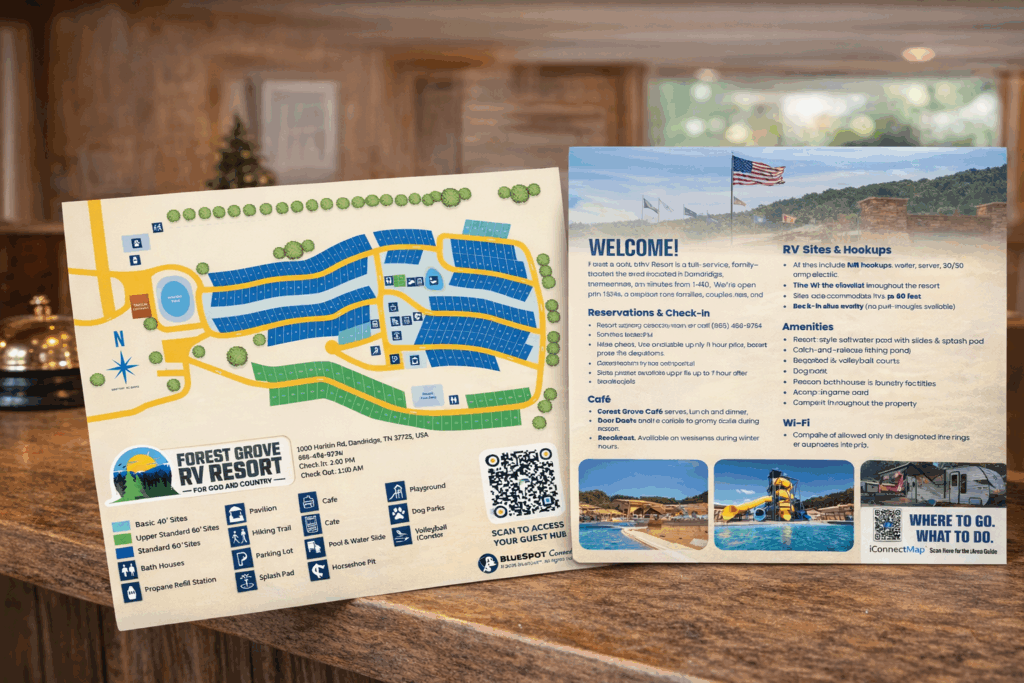
1) Start with a clean, readable printed layout
Your printed map should make sense in 5 seconds:
- Clearly mark: Office / Check-in, guest parking, bathhouses, trash, laundry, dump station, propane, store, playground
- Label roads the way your signage labels them
- Use obvious landmarks (pond, pavilion, bridge, gatehouse)
Tip: Walk the property with your current map. If a first-time guest would hesitate at an intersection, your map needs improvement.
2) Add scannable QR codes that open the Guest Hub
Your iConnectMap should include scannable QR codes that take guests to the same centralized experience every time:
- Guest Hub (property rules, Wi-Fi info, check-out steps)
- Digital Area Guide (local food, things to do, directions)
- “Right now” updates (closures, weather notices, fire guidance)
When fire danger changes, guests should know to check official restrictions and local alerts. The U.S. Forest Service explicitly advises checking for restrictions and closures before hiking or camping.
3) Use guest-friendly names (not internal labels)
Avoid staff shorthand like “Loop B West” if signage says “Pine Loop.”
Guests scan and search using human language:
- “Bathhouse”
- “Dog park”
- “Camp store”
- “Overflow parking”
- “Office”
If your labels don’t match what guests see on signs, they won’t trust the map.
Connect Physical Touchpoints to the Same Guest Hub
Use BlueSpot’s approved product pairing:
- iConnectMaps (printed + scannable QR codes) handed out at check-in
- iConnectTags (scannable QR tags) placed on signage, boards, and handouts
- iConnectTaps (NFC-enabled tap points) placed at the office, kiosks, and high-traffic areas
BlueSpot Connect uses scannable iConnectTags and tap-enabled iConnectTaps to give guests instant access to a no-download Guest Hub and Digital Area Guide. Whether guests scan or tap, they’re taken to the same centralized experience.
This is how you make guest communication feel consistent no matter where the guest is standing.
Make Accessibility and Safety Easier to Navigate

Guests with mobility needs, strollers, or limited visibility benefit from clear routes and clear information. The ADA standards and guidance describe accessible routes and path-of-travel concepts that include things like walks, ramps, parking access aisles, and interior circulation paths.
Practical ways to apply this on-property:
- Clearly identify accessible parking and accessible paths where applicable
- In the Guest Hub, list which bathhouses or amenities are most accessible
- Use simple, consistent labels and avoid confusing “back way” directions
For safety communication, link guests to emergency readiness basics and what to keep on hand. Ready.gov’s emergency kit guidance is a strong, guest-friendly reference.
Train Your Team So Maps Reduce Work (Not Add Work)
iConnectMaps work best when staff introduce them naturally:
At check-in (10 seconds):
“Here’s your printed map. If you scan the QR code, it opens our no-download Guest Hub with directions, rules, and local recommendations.”
For common questions:
Instead of repeating instructions, staff can say:
“Scan the map QR and tap ‘Bathhouse’ it’s all there.”
Create a simple internal checklist:
- Who updates Guest Hub content?
- Who reports changes (closed road, maintenance, event)?
- Where do staff send guests for the latest updates?
Keep It Accurate With a Simple Update Rhythm
Printed maps shouldn’t change weekly. Digital info can. That’s the point.
Use a light process:
- Weekly: update announcements (closures, events, reminders)
- Seasonally: update map details (new sites, renumbering, amenity changes)
- Immediately: update urgent items (fire restrictions, severe weather messaging)
Guests are often advised by public agencies to plan ahead, use maps, and follow safety guidance outdoors so your property info should support that habit, not fight it.
Conclusion: Make Navigation and Information Feel Effortless
When guests can quickly understand your layout and instantly access the right information, everything improves:
- Fewer repetitive questions
- Smoother arrivals (especially after hours)
- Better compliance with property rules
- Higher confidence, better reviews, less friction
iConnectMaps are printed maps with scannable QR codes and when they connect to a no-download Guest Hub and Digital Area Guide, they become a daily advantage for both guests and staff.
If you want to modernize guest communication without making it complicated, BlueSpot Connect gives you a clear, hospitality-first system: printed materials + scannable tags + tap points → one centralized Guest Hub experience.
FAQs
Are iConnectMaps digital maps?
No. iConnectMaps are printed maps with scannable QR codes. Guests scan the QR code to open the web-based Guest Hub (no app store required).
Are iConnectTags NFC?
No. iConnectTags are QR code only scannable with a phone camera.
For tap-based access, use iConnectTaps, which are NFC-enabled tap points.
Do guests have to download an app?
No. The Guest Hub is web-based and feels like an app, but requires no download.
Can we use this for safety updates like fire restrictions?
Yes without making risky promises. You can post guidance and link to official sources. The U.S. Forest Service recommends checking for restrictions and closures before camping or hiking.
Does BlueSpot Connect track guests personally?
Avoid that claim. Keep it simple: BlueSpot Connect is designed to improve access to information and reduce repetitive questions, not to promise personal tracking or sensitive data collection.