


Turning Everyday Touchpoints into Better Guest Experiences in 26
Guests today are surrounded by smartphones and QR codes, yet many still miss important information during their stay. The issue isn’t a lack of technology, it’s how information is shared, where it’s placed, and whether it’s easy to access at the exact moment guests need it.
In campgrounds, RV parks, and outdoor hospitality properties, this gap shows up every day. For example, guests often arrive after hours, find themselves wandering unfamiliar layouts, or end up asking the same questions repeatedly largely because information is scattered across paper sheets, posted signs, and one-off conversations.
By contrast, when guest communication is thoughtfully designed, physical spaces become clearer. As a result, staff feel less pressure, and in turn, guests feel more confident navigating their stay.
That’s the role BlueSpot Connect was built to play.
Why Guest Communication Needs to Change
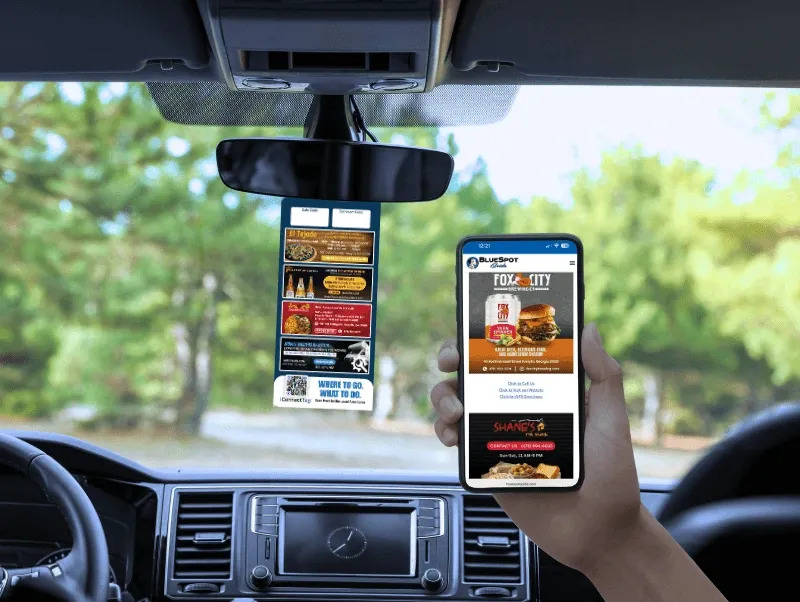
Most outdoor properties still rely heavily on static signs, printed binders, and front-desk explanations. These tools work until something changes.
In practice, weather updates, quiet hours, fire restrictions, amenity closures, and local events can all shift quickly. As a result, printed materials can’t keep up, and over time, staff end up repeating the same answers throughout the day.
Guests expect something simpler:
- One place for accurate information
- Easy access from their phone
- No downloads or apps
- Clear guidance without waiting
According to consumer experience research, travelers increasingly prefer self-service access to information when it’s easy and reliable. When they can find answers on their own, satisfaction improves and staff can focus on meaningful, personal interactions.
What iConnectTags Are (and What They Are Not)

iConnectTags are scannable QR tags.
They are printed and placed on physical items such as:
- Vehicle tags
- Property maps
- Directional signage
- Welcome handouts
To begin, guests scan the tag using their phone camera. As a result, a web-based, no-download Guest Hub opens.
That’s it no apps, no tapping, no NFC, no tracking claims.
The purpose of iConnectTags is simple:
give guests instant access to the information they need, exactly where they need it.
How iConnectTags Improve the Guest Experience
When placed intentionally, iConnectTags help guests:
- Find maps, amenities, and directions
- Review rules, quiet hours, and safety information
- Check Wi-Fi details and arrival instructions
- Explore the Digital Area Guide for nearby dining and attractions
Instead of guessing or waiting, guests scan and move forward with confidence.
For staff, this means:
- Fewer repetitive questions
- Less time spent explaining basics
- More time for real hospitality
At the same time, this isn’t about replacing people it’s about supporting staff efficiency and improving clarity across the property.
Using iConnectMaps to Improve Orientation
Large or spread-out properties can be confusing, especially for first-time visitors.
iConnectMaps are printed maps handed out at check-in. They include:
- A clear property layout
- Key locations and landmarks
- Emergency reference points
- A scannable QR code linking to the Guest Hub
Guests can orient themselves physically while still having digital access to updated details. Once you make an update, the system refreshes the digital content automatically. As a result, rule and event changes appear instantly, eliminating the need to reprint maps.
When iConnectTaps Make Sense
Some locations benefit from faster, tap-based access.
iConnectTaps are NFC-enabled tap points, typically placed at:
- Front desks
- Welcome boards
- Kiosks
- High-traffic common areas
Guests tap their phone to open the same Guest Hub experience.
Additionally, some taps may include a QR code as a fallback, but their primary function is NFC.
One Central Guest Hub, Multiple Ways to Access It
In these cases, guests can:
- Scan an iConnectTag
- Scan an iConnectMap
- Tap an iConnectTap
They’re always taken to the same centralized, web-based Guest Hub and Digital Area Guide.
BlueSpot Connect uses scannable iConnectTags and tap-enabled iConnectTaps to give guests instant access to a no-download Guest Hub and Digital Area Guide. Whether guests scan or tap, they’re taken to the same centralized experience.
Consistency is what makes the system effective.
Planning Placement That Actually Works
Successful use of iConnectTags starts with understanding guest behavior.
High-value locations include:
- Arrival points and check-in areas
- Vehicle tags and welcome packets
- Bathhouse and amenity entrances
- Common areas where guests pause or look for direction
Each tag should serve one clear purpose. However, overloading a single tag with too many options creates confusion instead of clarity.
Keeping Content Helpful and Up to Date
The strength of BlueSpot Connect isn’t novelty, it’s accuracy.
This means guest hub content can be updated instantly to reflect:
- Weather advisories
- Fire restrictions or burn bans
- Road or trail closures
- Seasonal rules and events
When information stays current, guests trust it. When guests trust it, they use it.
Conclusion: Clear Communication Is the New Guest Experience
As 2026 approaches, guest experience is increasingly defined not by amenities, but by clarity. In contrast, guests don’t want more paperwork or additional instructions; rather, they want reliable answers delivered at the right moment, without unnecessary friction.
That’s where BlueSpot Connect comes in. By connecting physical touchpoints to a centralized, no-download Guest Hub and Digital Area Guide, it helps campgrounds, RV parks, and outdoor hospitality properties modernize guest communication in a way that feels simple, intuitive, and effective.
The result is smoother arrivals, fewer repetitive questions, and more confident guests without adding complexity or burdening staff.
Clear communication isn’t a trend. It’s the foundation of a great stay.
Ready to simplify guest communication?
Learn how iConnectTags help campgrounds and RV parks give guests instant access to maps, rules, and local information without apps or added staff workload.
FAQ
Start small. Place iConnectTags where guests naturally pause check-in areas, vehicle tags, maps, and key amenities. Once those locations perform well, expand to other high-question areas.
Most low scans come down to visibility and clarity. Make sure the tag is easy to see, the QR code is large, and the benefit is clear at a glance.
Update the Guest Hub anytime rules, Wi-Fi details, hours, weather advisories, or access conditions change. Accurate content builds trust and repeat use.
During arrival. A quick prompt at check-in or in a welcome message sets expectations and drives usage.
Best Practices
- Do a quick walk-through monthly in high-traffic areas
- Replace tags that are faded, scratched, or peeling
- Keep extras on hand for fast swaps
- Make sure the destination content still matches what the printed tag promises
Consistent upkeep protects guest trust and keeps your Guest Hub experience reliable.